

Updated:
Originally Published:
Imagine trying to build a LEGO® city using only a single instruction booklet for every building, bridge, and vehicle. You’d waste time flipping pages and constantly adjusting pieces that don’t quite fit. That’s what traditional 2D drafting feels like in modern civil engineering.
Now imagine each structure comes with its own perfectly-tailored guide, and all of them snap together seamlessly in a shared cityscape. That’s the power of combining Autodesk Revit and Advance Steel: a workflow that’s modular, intelligent, and built for collaboration.
Every part is modeled in 3D, connections are validated automatically, and outputs are generated with precision. It’s not just faster—it’s smarter, more scalable, and built for the complexity of modern utility infrastructure.
In the evolving world of civil and structural engineering, the integration of Building Information Modeling (BIM) tools like Revit and Advance Steel is transforming how utility structures are designed, detailed, and delivered. This shift is not just about adopting new software—it’s about rethinking workflows to enhance efficiency, accuracy, and collaboration across disciplines.
Intelligent 3D modeling is rapidly replacing traditional 2D drafting methods. The benefits are clear: faster design cycles, reduced manual errors, and higher-quality outputs. By leveraging Revit for 3D modeling and Advance Steel for detailing, engineers can automate dimensioning, generate intelligent annotations, and streamline the entire detailing process.
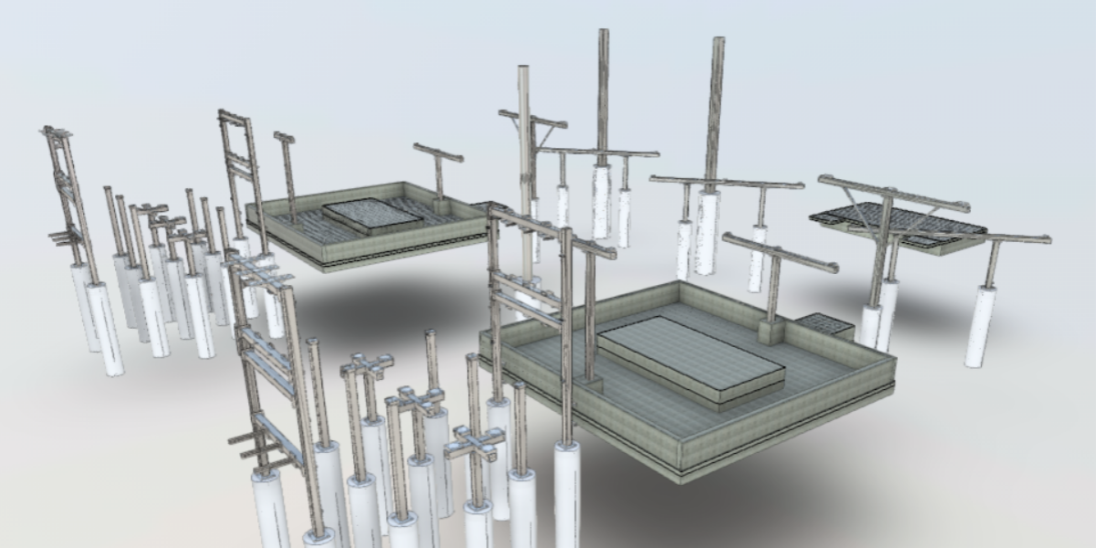
The workflow begins with creating a collaborative model in Revit. Engineers overlay general arrangement drawings, set up structural grids, and model individual structures—ranging from simple base plates to complex dead-end towers. These models are then exported to Advance Steel using the SMLX file format, preserving all user-defined data and geometry.
Once in Advance Steel, the models are imported with full fidelity, including holes, welds, and user data. A key feature is the synchronization capability, which allows updates made in Revit to be reflected in Advance Steel without redoing the entire model. This ensures consistency and saves significant time during revisions.
Automation plays a central role in this workflow. Custom drawing standards and templates in Advance Steel allow engineers to generate detailed fabrication drawings with just a few clicks. These include live-updating bills of materials (BOMs), section cuts, weld callouts, and dimensions—all formatted according to company standards.
Revit excels at creating high-detail BIM coordination models, including foundation drawings and material takeoffs. However, Advance Steel brings powerful automation tools to the table, enabling the generation of anchor bolt BOMs, bolt counts, and CNC-ready files. This is particularly valuable for companies with in-house fabrication capabilities, as it eliminates redundant modeling steps and accelerates the path from design to manufacturing.
A strategic decision in this workflow is to model each structure in its own Revit file. These individual models are then linked into a central coordination model. This approach offers several advantages:
The central model serves as a visual library and coordination hub, allowing for accurate scheduling and quantity takeoffs. Linked models can be counted and scheduled, providing real-time insights into project scope and material requirements.
Beyond detailing, the Revit-Advance Steel workflow enhances coordination across disciplines. By integrating civil 3D grading data into Revit, teams create a unified 3D environment for BIM coordination—improving communication, reducing errors, and accelerating project timelines.
Revit’s scheduling tools also unlock powerful data management capabilities. Engineers can generate rebar schedules, steel takeoffs, and BOMs directly from the model—even when structures are linked rather than embedded. This enables quick, accurate estimates and supports better decisions during procurement and construction planning.
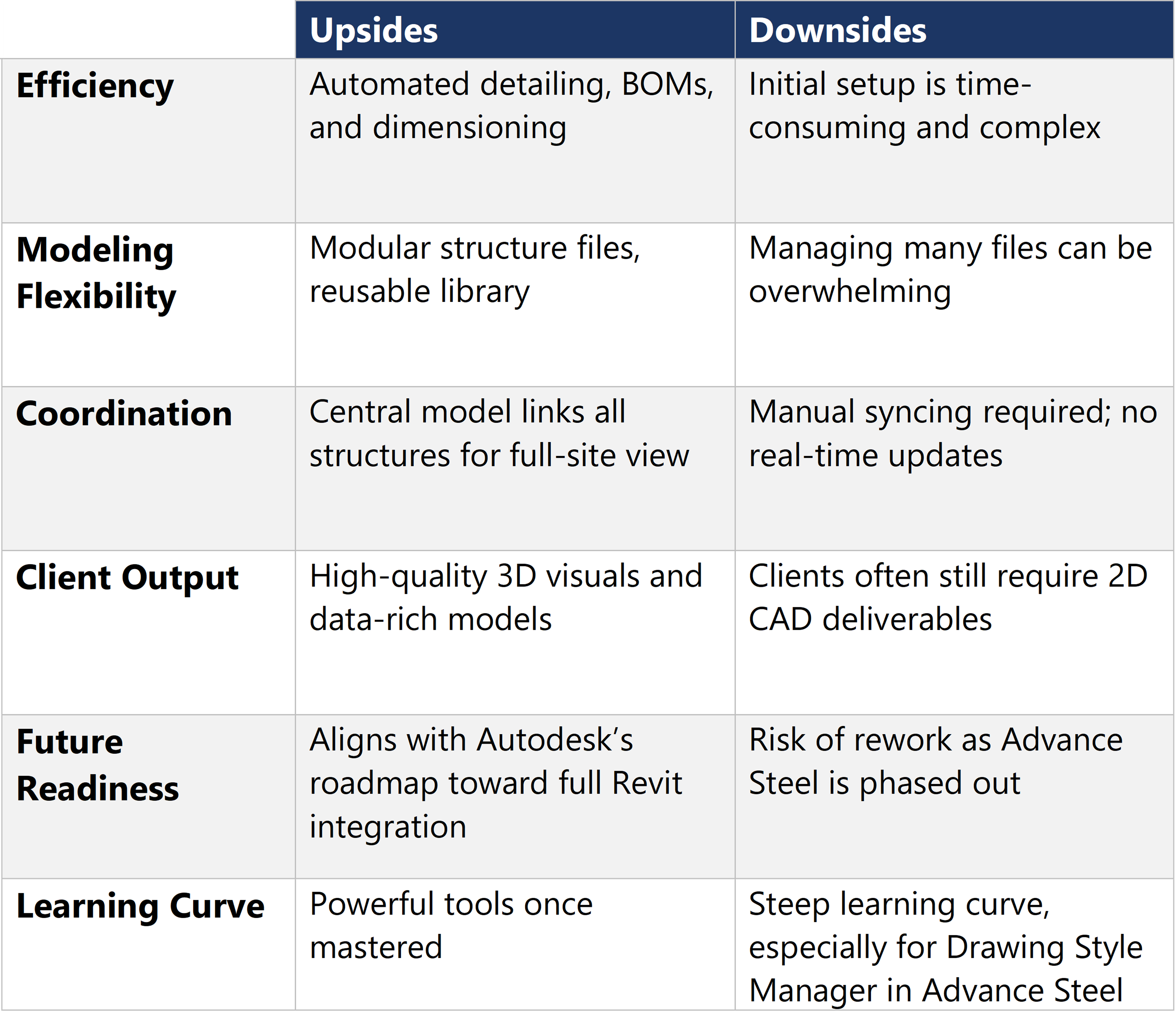
Like any workflow, integrating Revit and Advance Steel has tradeoffs. Here’s what you should consider when deciding whether to integrate them:
Autodesk has announced plans to integrate Advance Steel’s capabilities directly into Revit. By modeling in Revit today, civil engineers are positioning themselves for the future of steel detailing, where automation and BIM integration converge.
With parametric data embedded in the models, the door is open for advanced automation. From generating analytical models for finite element analysis (FEA) to automating repetitive detailing tasks, the possibilities for improved design workflows are vast. As the industry continues to embrace digital transformation, these capabilities will become essential for staying competitive.
Beta Engineering is a substation EPC company headquartered in Pineville, Louisiana, with an office in San Diego. Since 1975, we’ve partnered with utilities across the U.S. to deliver high-voltage substation and transmission projects with lasting reliability. Contact our team to learn how we apply over 50 years of industry experience to help our clients design and build with greater confidence and less rework.
Updated:
October 21, 2025
Updated:
Originally Published:
Imagine trying to build a LEGO® city using only a single instruction booklet for every building, bridge, and vehicle. You’d waste time flipping pages and constantly adjusting pieces that don’t quite fit. That’s what traditional 2D drafting feels like in modern civil engineering.
Now imagine each structure comes with its own perfectly-tailored guide, and all of them snap together seamlessly in a shared cityscape. That’s the power of combining Autodesk Revit and Advance Steel: a workflow that’s modular, intelligent, and built for collaboration.
Every part is modeled in 3D, connections are validated automatically, and outputs are generated with precision. It’s not just faster—it’s smarter, more scalable, and built for the complexity of modern utility infrastructure.
In the evolving world of civil and structural engineering, the integration of Building Information Modeling (BIM) tools like Revit and Advance Steel is transforming how utility structures are designed, detailed, and delivered. This shift is not just about adopting new software—it’s about rethinking workflows to enhance efficiency, accuracy, and collaboration across disciplines.
Intelligent 3D modeling is rapidly replacing traditional 2D drafting methods. The benefits are clear: faster design cycles, reduced manual errors, and higher-quality outputs. By leveraging Revit for 3D modeling and Advance Steel for detailing, engineers can automate dimensioning, generate intelligent annotations, and streamline the entire detailing process.
The workflow begins with creating a collaborative model in Revit. Engineers overlay general arrangement drawings, set up structural grids, and model individual structures—ranging from simple base plates to complex dead-end towers. These models are then exported to Advance Steel using the SMLX file format, preserving all user-defined data and geometry.
Once in Advance Steel, the models are imported with full fidelity, including holes, welds, and user data. A key feature is the synchronization capability, which allows updates made in Revit to be reflected in Advance Steel without redoing the entire model. This ensures consistency and saves significant time during revisions.
Automation plays a central role in this workflow. Custom drawing standards and templates in Advance Steel allow engineers to generate detailed fabrication drawings with just a few clicks. These include live-updating bills of materials (BOMs), section cuts, weld callouts, and dimensions—all formatted according to company standards.
Revit excels at creating high-detail BIM coordination models, including foundation drawings and material takeoffs. However, Advance Steel brings powerful automation tools to the table, enabling the generation of anchor bolt BOMs, bolt counts, and CNC-ready files. This is particularly valuable for companies with in-house fabrication capabilities, as it eliminates redundant modeling steps and accelerates the path from design to manufacturing.
A strategic decision in this workflow is to model each structure in its own Revit file. These individual models are then linked into a central coordination model. This approach offers several advantages:
The central model serves as a visual library and coordination hub, allowing for accurate scheduling and quantity takeoffs. Linked models can be counted and scheduled, providing real-time insights into project scope and material requirements.
Beyond detailing, the Revit-Advance Steel workflow enhances coordination across disciplines. By integrating civil 3D grading data into Revit, teams create a unified 3D environment for BIM coordination—improving communication, reducing errors, and accelerating project timelines.
Revit’s scheduling tools also unlock powerful data management capabilities. Engineers can generate rebar schedules, steel takeoffs, and BOMs directly from the model—even when structures are linked rather than embedded. This enables quick, accurate estimates and supports better decisions during procurement and construction planning.
Like any workflow, integrating Revit and Advance Steel has tradeoffs. Here’s what you should consider when deciding whether to integrate them:
Autodesk has announced plans to integrate Advance Steel’s capabilities directly into Revit. By modeling in Revit today, civil engineers are positioning themselves for the future of steel detailing, where automation and BIM integration converge.
With parametric data embedded in the models, the door is open for advanced automation. From generating analytical models for finite element analysis (FEA) to automating repetitive detailing tasks, the possibilities for improved design workflows are vast. As the industry continues to embrace digital transformation, these capabilities will become essential for staying competitive.
Beta Engineering is a substation EPC company headquartered in Pineville, Louisiana, with an office in San Diego. Since 1975, we’ve partnered with utilities across the U.S. to deliver high-voltage substation and transmission projects with lasting reliability. Contact our team to learn how we apply over 50 years of industry experience to help our clients design and build with greater confidence and less rework.
Related Services:


